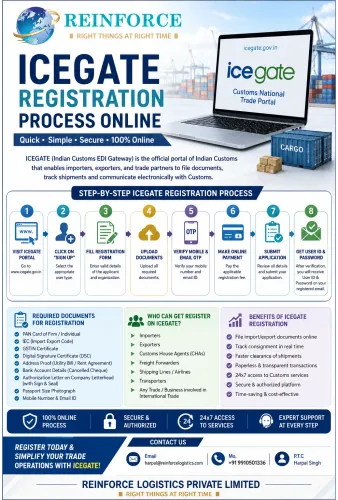


Step 1: Open the Official ICEGATE Portal
Start your ICEGATE Registration Online process through the official website:
The ICEGATE homepage provides a Register Now option for users who are not already registered. The portal also provides access to registration services, advisories, help resources and other customs-related facilities.
Why Use Only the Official Portal?
Customs registration involves sensitive business information.
Avoid entering your:
- IEC
- PAN
- Aadhaar information
- DSC information
- Contact details
- Login credentials
on unofficial websites.
A freight forwarder, customs broker or consultant can guide you, but the actual government portal should remain your primary source for registration.
CTA: Always verify that you are working on the official ICEGATE website before entering business or personal information.
Step 2: Select “Register Now”
On the ICEGATE homepage, select Register Now.
This takes you into the registration workflow.
The exact appearance of the website can change as ICEGATE updates its technology and services. Therefore, do not depend solely on screenshots from old registration tutorials.
The current ICEGATE registration services provide registration-related options and resources, including DSC registration. (icegate.gov.in)
Important Tip
If you already have an ICEGATE account or have previously started registration, check your existing status before creating a new application.
Creating duplicate registrations can cause confusion and unnecessary delays.
CTA: First determine whether you are a completely new user or continuing an existing registration.
Step 3: Select the Correct User Type
This is one of the most important parts of the ICEGATE Portal Registration process.
Different stakeholders have different roles.
For example:
- An importer may register as an IEC holder.
- An employee may be registered as an authorized person/child user where applicable.
- A Customs Broker has a different role.
- A shipping line has a different role.
- An airline or air agent may have another category.
The official ICEGATE registration advisory identifies multiple stakeholder categories and explains different registration structures. (icegate.gov.in)
Parent User vs Child User
For IEC holders, ICEGATE provides a structure involving:
Parent User → Employee/Child Users
The parent user acts as the principal account, while eligible employees can receive child-user access.
Why Is This Useful?
Consider a manufacturing company with:
- Export Manager
- Import Executive
- Documentation Executive
- Accounts Executive
Instead of treating every employee as the primary organization account, the business can use an appropriate parent/child-user structure where permitted.
This can improve internal responsibility and access management.
Important Internal Control
When an employee leaves the organization, businesses should review and disable/remove access as applicable.
CTA: Establish an internal ICEGATE access policy so that employee access remains aligned with their job responsibilities.
Step 4: Enter IEC and Organization Information
For an importer or exporter, the IEC is a critical identifier.
Enter the requested information carefully.
Check:
- IEC number
- Organization name
- PAN
- GSTIN where applicable
- Registered address/details
- Contact information
The ICEGATE registration manual states that IEC, GSTIN and other details entered during registration should match the corresponding submitted documents. (icegate.gov.in)
Why Name Matching Matters
Suppose the PAN record says:
XYZ TEXTILES PRIVATE LIMITED
but the application says:
XYZ Textiles Pvt. Ltd.
It may look like a harmless abbreviation, but government systems and verification processes can rely on exact data matching.
Best Practice
Use the legal name exactly as it appears in the relevant official records.
Do not use:
- Brand name
- Short name
- Trade name
- Informal abbreviation
unless the particular field specifically asks for it.
CTA: Compare your IEC, PAN and GST-related records before clicking submit.
Step 5: Verify Registered Contact Details
Your email and mobile information are important during ICEGATE registration.
The official registration manual states that registration for importers/exporters uses the email ID and contact number registered with GSTN or DGFT, as applicable. (icegate.gov.in)
If your contact information is outdated, you may need to update it through the appropriate authority before proceeding.
Example
A company registered its business in 2022 using:
Email: accounts@oldcompany.com
In 2026, the company uses:
Email: customs@newcompany.com
If the official records still contain the old address, the business should resolve the discrepancy before attempting registration.
Why This Matters
Registration-related communication may be sent to the registered email address.
If your company does not control that email account, you could miss important communication.
CTA: Use a monitored business email address and nominate one employee to monitor customs-related communications.
Step 6: Enter Authorized Person Details
The authorized person is an important part of the registration process.
The ICEGATE registration manual indicates that the authorized person/parent user's name should correspond with the relevant PAN and Aadhaar records. (icegate.gov.in)
Before Entering the Information
Check:
- Full legal name
- PAN
- Aadhaar details where applicable
- Mobile number
- Email address
- Organization relationship
- Authorization status
Business Example
A company appoints its Export Manager as an authorized person.
Before registration, the company should ensure that the Export Manager's legal details are entered consistently with the applicable identity records.
A simple spelling difference can become a verification problem.
CTA: Never guess an authorized person's legal name. Use the relevant official document as your reference.
Step 7: Complete Identity Verification Where Required
Depending on the current workflow and user category, ICEGATE may require electronic verification or authentication.
The official registration material includes Aadhaar/DigiLocker-related requirements for applicable users.
Practical Preparation
Keep available:
- Mobile phone
- Aadhaar-linked services where applicable
- DigiLocker access where required
- Authorized person's identity information
- Active email
- Valid DSC where applicable
Security Recommendation
Do not share OTPs or authentication credentials with unauthorized people.
A company should treat ICEGATE credentials as sensitive business information.
CTA: Complete authentication using the authorized person's own credentials and maintain strict access control.
Step 8: Prepare and Use the Digital Signature Certificate
A Digital Signature Certificate (DSC) is an important component of electronic customs processes for applicable users.
ICEGATE provides a dedicated DSC registration facility and related guidance. (icegate.gov.in)
What Should You Check?
Before starting:
- DSC is valid
- DSC has not expired
- Correct authorized person is using it
- USB token is available where applicable
- Required drivers/utilities are installed
- Browser/system configuration supports the current ICEGATE workflow
Why Businesses Face DSC Problems
Common technical issues include:
- Expired certificate
- Wrong certificate selected
- Token not detected
- Driver problem
- Unsupported browser configuration
- Certificate belonging to another person
Expert Recommendation
Do a DSC test before your shipment is urgent.
Do not wait until cargo is already at the airport, seaport or ICD.
CTA: Test your DSC during business hours and keep your organization's certificate renewal date on a compliance calendar.
Step 9: Upload Required Documents
After entering the required information, upload the documents applicable to your user category.
Typical documents can include:
- IEC/commercial licence
- PAN-related documents
- Authorization letter
- Identity-related information
- Other role-specific documents
The official ICEGATE manual specifies document and information requirements according to the registration category. (icegate.gov.in)
Document Quality Checklist
Before uploading, verify:
Name
The name should match the applicable official record.
Readability
The document should be clear enough for verification.
Completeness
Do not upload a partial document.
Signature
Where self-attestation or authorization is required, ensure the appropriate signature is present.
Validity
Do not upload an expired licence or outdated authorization document where a current version is required.
CTA: Maintain a dedicated digital folder containing the final versions of all documents submitted during ICEGATE registration.
Step 10: Review the Registration Application
Before submitting, stop and review everything.
This is one of the most valuable steps in the entire ICEGATE Registration Process.
Check:
InformationVerifyCompany nameMatches PANIECCorrectGSTINCorrect where applicablePANCorrectAuthorized personCorrectEmailActiveMobileActiveDocumentsCorrect and readableDSCValid where applicableUser categoryCorrectAuthorizationCurrentReference IDSaved
The 5-Minute Rule
Spend five minutes reviewing the application before submission.
Five minutes of checking can prevent days of avoidable correction.
CTA: Have a second employee independently review the application whenever possible.
Step 11: Submit the Registration Request
Once all information is correct, submit the application.
Do not assume that the registration is automatically approved immediately after submission.
The official ICEGATE registration advisory explains that registration requests are subject to approval by the department. (icegate.gov.in)
What Happens Next?
Depending on the result:
Approved → relevant registration/login information is communicated.
Rejected → the rejection reason is communicated, allowing the applicant to address the issue.
This distinction is important.
Submitted Does Not Mean Approved
A company should not tell its supplier or customer:
“Our ICEGATE registration is completed.”
simply because the application has been submitted.
A more accurate statement is:
“Our ICEGATE registration application has been submitted and is awaiting processing/approval.”
CTA: Confirm approval before treating ICEGATE registration as operational.
Step 12: Save Your Reference ID
The Reference ID is an important part of the registration workflow.
The official ICEGATE manual states that a Reference ID generated during registration is valid for 15 days and that the registration process should be completed within the applicable validity period. (icegate.gov.in)
Therefore:
Do not lose your Reference ID.
Save it in:
- Secure company records
- Registration folder
- Authorized employee's records
- Internal compliance tracker
Recommended File Name
A simple internal naming format can be:
ICEGATE_Registration_CompanyName_2026
Avoid storing sensitive credentials in unsecured spreadsheets or publicly accessible folders.
CTA: Save your Reference ID immediately after it is generated.
Step 13: Monitor Your Registered Email
After submission, monitor the registered email address.
ICEGATE's registration advisory states that approval/rejection communication and relevant login credentials are communicated through registered email channels for applicable users. (icegate.gov.in)
Create an Internal Responsibility
Assign one person to check:
- ICEGATE messages
- Customs advisories
- Registration status
- Rejection communication
- Required corrections
- Login/access notifications
This prevents an important government communication from sitting unread in an inbox.
CTA: Make ICEGATE email monitoring part of your import-export documentation SOP.
Parent User and Child User: Detailed Explanation
The parent/child-user structure is especially relevant to medium and large organizations.
What Is a Parent User?
A parent user is the principal user associated with the organization or relevant account structure.
The parent user can have responsibility for managing applicable employee access.
What Is a Child User?
A child user is an employee or additional authorized user created under the applicable parent-user structure.
Example
Consider a company called ABC Auto Components Pvt. Ltd.
It has:
- Director
- Import Manager
- Export Executive
- Documentation Executive
- Accounts Manager
The organization may establish an appropriate parent-user arrangement and provide relevant access to employees as permitted by ICEGATE.
Why Child Users Are Useful
They can help businesses:
- Divide responsibilities
- Avoid unnecessary credential sharing
- Maintain better internal access control
- Give employees access appropriate to their duties
- Improve operational continuity
Employee Exit Procedure
When an employee leaves:
- Identify the user's ICEGATE access.
- Disable/remove access as applicable.
- Change internal credentials where necessary.
- Reassign responsibility.
- Update the company's access register.
The official ICEGATE advisory specifically provides guidance on disabling child users when employees leave for relevant user categories. (icegate.gov.in)
CTA: Maintain a monthly review of ICEGATE users, especially if multiple employees access the organization's customs workflow.
ICEGATE Registration vs ICEGATE Login
These terms are often used interchangeably, but they are different.
RegistrationLoginCreates the user's accessUses existing accessRequires registration informationRequires credentials/authenticationMay require document submissionUsually occurs after registration approvalFirst-time activityRoutine activityCan involve verification/approvalProvides access to available services
Simple Example
Registration = Creating and approving the account
Login = Using the approved account
A business should first complete registration and approval before expecting normal login access.
CTA: If login is failing, first determine whether the problem is actually an account-registration issue.
What Are the Benefits of ICEGATE Registration?
Businesses often ask whether ICEGATE registration actually provides practical value.
For importers and exporters, the benefits are primarily connected with electronic interaction and customs-related processes.
1. Digital Customs Interaction
ICEGATE provides an electronic interface between eligible trade users and Customs.
2. Online Services
Users can access relevant services electronically rather than depending entirely on physical processes.
3. Better Visibility
Electronic systems can make it easier to track and manage relevant customs information.
4. Faster Documentation Workflow
Digital submission and communication can reduce unnecessary manual handling.
5. Better Business Control
A company can centralize responsibility for customs-related electronic processes.
6. Employee Access Management
Eligible organizations can use appropriate user structures to manage employee access.
7. Better Integration With Modern Logistics
Modern freight forwarding and customs operations depend heavily on digital documentation and electronic communication.
CTA: Businesses with regular import-export activity should treat digital customs readiness as part of their overall logistics strategy.
Business Example: Importing Goods From China
Consider a Delhi NCR electronics importer purchasing commercial goods from Shenzhen.
The business needs to coordinate:
Before Shipment
- Supplier documentation
- Product details
- HS classification
- IEC
- ICEGATE access
- Freight quotation
- Insurance where applicable
- Customs documentation
- Regulatory requirements
During Transportation
- Booking
- Pickup
- Export documentation
- Freight movement
- Arrival planning
In India
- Bill of Entry
- Customs assessment
- Duty/tax payment
- Examination where applicable
- Customs clearance
- Cargo release
- Transportation to warehouse
ICEGATE registration is therefore one component of a much larger import process.
Where Reinforce Logistics Can Help
Reinforce Logistics can coordinate relevant freight-forwarding and customs-clearance requirements so that the importer does not have to manage each stage independently.
CTA: If you are importing from China, compare your customs preparation with your freight schedule before cargo departure.
Business Example: Exporting From Delhi NCR to the USA
Now consider a Greater Noida engineering manufacturer exporting machinery to the USA.
The company may need to coordinate:
Factory → Packaging → Inland Transportation → Airport/ICD/Port → Export Customs → International Freight → Destination Customs → Final Delivery
A logistics provider can help coordinate the freight and customs components.
However, the exporter remains responsible for providing accurate commercial information and complying with applicable laws and regulations.
CTA: For export shipments, prepare documentation and customs processes before cargo pickup rather than after the shipment reaches the gateway.
Common ICEGATE Registration Problems
Even a straightforward registration can become difficult if the information is inconsistent.
Problem 1: PAN and Company Name Mismatch
Cause: Different legal names entered in different records.
Solution: Use the official PAN name.
Problem 2: Wrong Contact Details
Cause: GSTN/DGFT information is outdated.
Solution: Update the relevant government record before registration where required.
Problem 3: DSC Not Working
Cause: Expired certificate, token issue or technical configuration.
Solution: Check the certificate and required system components in advance.
Problem 4: Incorrect User Category
Cause: Applicant selected the wrong stakeholder role.
Solution: Review the official registration advisory before starting.
Problem 5: Registration Left Incomplete
Cause: Reference ID validity period expires.
Solution: Complete the process within the applicable validity period.
Problem 6: Employee Credentials Shared
Cause: Businesses share one login for convenience.
Solution: Use the appropriate parent/child-user structure where available.
Problem 7: No One Monitors Registered Email
Cause: Registration communication goes unnoticed.
Solution: Assign responsibility to a specific employee.
CTA: Most registration problems are easier to prevent than to correct. Build a verification step into your internal SOP.
ICEGATE Registration Best Practices for 2026
Keep a Master Compliance File
Maintain one controlled folder containing:
- IEC
- PAN
- GST documents
- Authorized-person records
- DSC information
- Authorization letters
- ICEGATE registration details
- Relevant customs documentation
Maintain a Renewal Calendar
Track:
- DSC expiry
- Licences
- Authorizations
- Employee access
- Contact information
Review Access Regularly
At least periodically, confirm that active users still require access.
Keep Government Records Updated
Changes in:
- Company address
- Authorized person
- Mobile
- Business structure
may require updates across relevant systems.
Never Depend on One Employee
If only one person knows how to access and manage your customs systems, the business faces continuity risk.
Create a controlled backup responsibility.
CTA: Build ICEGATE access management into your company's annual compliance review.
ICEGATE Registration: Quick Comparison
ApproachAdvantageRiskSelf-registrationDirect controlRequires careful document preparationProfessional guidanceExpert supportService fees may applyLast-minute registrationConvenient initiallyHigh risk of shipment-related delaysEarly registrationBetter planningRequires advance preparationShared loginSimple initiallyPoor security and accountabilityControlled user accessBetter accountabilityRequires internal administration
Expert Recommendation
For experienced importers/exporters with organized documentation, self-registration can be practical.
For a new importer, first-time exporter, regulated commodity shipper or company with complex documentation, professional customs/logistics guidance can reduce operational risk.
CTA: Choose the approach based on your shipment complexity, internal expertise and time available—not simply on registration cost.
Why Reinforce Logistics Is a Practical Logistics Partner
For an importer or exporter, the biggest challenge is often not one individual registration.
It is coordinating the complete shipment.
Reinforce Logistics Private Limited supports businesses with:
- International Freight Forwarding
- Customs Clearance
- Air Freight
- Sea Freight
- Import-Export Logistics
- LCL Consolidation
- Warehousing
- Door-to-Door Logistics
- International Courier
- Cargo Transportation
The company is based in Greater Noida, Delhi NCR, and supports businesses with logistics requirements across India and international trade lanes.
A Complete Logistics Perspective
A shipment can move through:
Supplier → Pickup → Export Customs → International Freight → Indian Customs → Clearance → Transportation → Warehouse → Final Delivery
A logistics partner should understand how these activities connect.
For Delhi NCR manufacturers, traders, MSMEs and exporters, this integrated approach can make international shipping easier to manage.
CTA: If your business needs both customs clearance and international freight coordination, speak with Reinforce Logistics before booking your next shipment.
Part 2 Key Takeaways
The ICEGATE Registration Process Online becomes easier when businesses follow a structured approach.
Remember These 10 Points
- Start from the official ICEGATE portal.
- Select the correct user category.
- Verify IEC and PAN information.
- Ensure government-registered contact details are correct.
- Enter the authorized person's details accurately.
- Prepare applicable Aadhaar/DigiLocker information.
- Keep a valid DSC ready where required.
- Upload correct and readable documents.
- Save the Reference ID.
- Monitor the registered email until approval.
Most importantly, do not confuse registration submission with registration approval.
Your customs and logistics planning should begin before cargo movement—not after cargo reaches the Indian gateway.
What Will Be Covered in Part 3?
Part 3 will focus on the next level of practical guidance, including:
- What to do after ICEGATE registration
- ICEGATE login and account management
- DSC registration and troubleshooting
- Parent and child-user management
- Common rejection reasons
- ICEGATE registration mistakes
- Customs clearance coordination
- Importer/exporter compliance checklist
- ICEGATE FAQs
- People Also Ask questions
- Expert recommendations
- SEO-ready conclusion and lead-generation section
- How Reinforce Logistics can support your import-export operations
Need Help With ICEGATE and International Logistics?
Completing ICEGATE registration is only the beginning.
If your business also needs customs clearance, air freight, sea freight, LCL consolidation, international freight forwarding, warehousing or door-to-door cargo delivery, Reinforce Logistics Private Limited can help coordinate your logistics requirements.
Reinforce Logistics Private Limited
Right Things at Right Time
Phone: +91 9910501336
Email: harpal@reinforcelogistics.com
Location: Greater Noida, Delhi NCR
Operations: Pan India + Global Shipping
Contact Reinforce Logistics for professional import-export logistics and customs clearance support.
Learn how to register on ICEGATE online in 2026, including eligibility, documents, registration steps, benefits, common mistakes and expert tips.
ICEGATE Registration Process online, Benefits of ICEGATE Registration, Required docs for ICEGATE Registration, ICEGATE Registration Online, ICEGATE Portal Registration, ICEGATE Registration Process, ICEGATE Registration process complete Guide 2026, How to register on ICEGATE